Author: adil

  • How to Optimize Images for WordPress Blog Posts

    INSIGHTS / THE DIGITAL PENGUIN

    How to Optimize Images for WordPress Blog Posts
    How to fix images for blog posts using code in WordPress

    Images make blog posts readable, shareable, and engaging — and they’re also, on most WordPress sites, the single biggest performance problem. Every oversized photo slows your load time, which hurts user experience, conversions, and your Google rankings all at once. The good news: image optimization is very fixable. Here’s the complete checklist.

    Why image optimization matters

    • Speed: images typically account for half or more of a page’s total weight. Shrink them and the whole page gets faster.
    • SEO: page speed is a ranking factor, and optimized images with good alt text can also rank in Google Images — a traffic source most sites ignore.
    • User experience: visitors on mobile data won’t wait for a 4 MB hero photo. They’ll leave.

    1. Resize before you upload

    The most common mistake is uploading photos straight from a camera or phone — often 4000+ pixels wide — into a blog column that displays at 800px. Resize images to roughly the maximum size they’ll actually display (for most blog layouts, 1200–1600px wide is plenty) before uploading.

    2. Choose the right format

    • JPEG — photos and complex images. Best balance of quality and size.
    • PNG — screenshots, logos, and anything needing transparency. Larger files, so use only when needed.
    • WebP — the modern format, typically 25–35% smaller than JPEG at the same quality. WordPress has supported WebP uploads since version 5.8.
    • SVG — icons and simple graphics. Infinitely scalable, tiny file size (requires a plugin to enable safely).

    3. Compress — automatically

    Compression plugins optimize every image on upload and can bulk-optimize your existing media library. Reliable options include Smush, ShortPixel, Imagify, and EWWW Image Optimizer. Most can also convert images to WebP automatically. Set it once, and every future upload is handled.

    4. Use lazy loading

    Lazy loading delays loading images until the visitor actually scrolls near them, which dramatically speeds up the initial page view. WordPress adds this automatically now, but you can control it per image in your theme or HTML:

    <img src="chart.webp" alt="Organic traffic growth chart"
         loading="lazy" width="800" height="450">

    5. Always set width and height

    When an image has no declared dimensions, the browser doesn’t know how much space to reserve — so the page “jumps” as images load. That jump is Cumulative Layout Shift (CLS), one of Google’s Core Web Vitals. Declaring width and height (as in the snippet above) fixes it, and this CSS keeps images responsive inside your content column:

    .post-content img {
      max-width: 100%;
      height: auto;
      display: block;
      margin: 1.5rem auto;
      border-radius: 8px;
    }

    6. Let WordPress serve responsive sizes

    WordPress automatically generates several sizes of each upload and uses srcset so phones get small versions and desktops get large ones. You can add your own size for your theme’s content width in functions.php:

    add_image_size( 'blog-content', 1200, 0, false );

    Then regenerate thumbnails (with a plugin like Regenerate Thumbnails) so older uploads get the new size too.

    7. Don’t forget alt text and file names

    Name files descriptively before uploading (wordpress-image-optimization-checklist.webp, not IMG_8843.jpg) and write alt text that describes what the image shows. It’s an accessibility requirement, and it’s how your images earn rankings in Google Images.

    The bottom line

    Image optimization is one of the highest-return fixes in WordPress: an afternoon of setup that makes every page faster forever. If you’d rather have us audit and speed up your whole site — images, caching, hosting, and all — our website development and SEO teams do exactly that.

  • How to Improve SEO on WordPress: A Practical Guide

    INSIGHTS / THE DIGITAL PENGUIN

    How to Improve SEO on WordPress: A Practical Guide

    How to improve SEO on WordPress — designer working at a laptop

    WordPress powers a huge share of the web, partly because it’s genuinely SEO-friendly out of the box: clean code, easy content editing, and thousands of plugins. But “friendly” is not the same as “optimized.” If you want your WordPress site on top of the search results, here’s what actually matters — in the order we’d do it.

    1. Fix your foundations first

    Set SEO-friendly permalinks

    Go to Settings → Permalinks and choose Post name. URLs like /wordpress-seo-guide/ tell both users and Google what a page is about; /?p=123 tells them nothing.

    Check your visibility setting

    Under Settings → Reading, make sure “Discourage search engines from indexing this site” is unchecked. It sounds obvious — but forgotten staging settings are one of the most common reasons a new site never appears in Google.

    Use HTTPS

    An SSL certificate is a confirmed (if small) ranking signal, and browsers flag non-HTTPS sites as “not secure” — a trust killer for visitors.

    2. Install one good SEO plugin

    Yoast SEO and Rank Math are the two leading choices; either gives you control over title tags, meta descriptions, XML sitemaps, canonical URLs, and schema markup without touching code. Install one (not both), run its setup wizard, and submit the sitemap it generates to Google Search Console.

    3. Optimize every post before you hit publish

    • One target keyword per page, used naturally in the title, first paragraph, at least one subheading, and the URL.
    • A title tag worth clicking — around 55–60 characters, keyword near the front, with a reason to click.
    • A meta description that sells the click — roughly 150–160 characters summarizing the value of the page.
    • Headings that structure the page — one H1, logical H2s/H3s. Screen readers and search engines both rely on them.
    • Internal links to and from related posts, so authority flows through your site and visitors keep reading.
    • Alt text on every image — describe the image plainly; include a keyword only when it genuinely fits.

    4. Make speed a priority

    Page speed affects rankings, bounce rate, and conversions. The biggest wins on WordPress, in order:

    1. Optimize your images — usually the single largest cause of slow pages. (Full guide: how to optimize images in WordPress.)
    2. Use a caching plugin such as WP Rocket, W3 Total Cache, or LiteSpeed Cache.
    3. Choose quality hosting — cheap shared hosting caps your speed no matter what you optimize.
    4. Keep themes and plugins lean — deactivate and delete what you don’t use; every active plugin is code that has to load.

    5. Keep WordPress healthy

    • Update core, themes, and plugins regularly — outdated software is both a security and an SEO risk.
    • Fix broken links and set up 301 redirects when URLs change.
    • Monitor Google Search Console for indexing errors, mobile usability issues, and the queries you’re ranking for.
    • Refresh old content — updating a slipping post is often faster than writing a new one, and Google rewards freshness.

    The bottom line

    WordPress gives you every tool you need to rank — permalinks, plugins, and full control over your content. What it can’t automate is strategy: choosing the right keywords, writing content worth ranking, and building the authority behind it. That part is ours if you want it: see our SEO services or get a free quote.

  • What Are Backlinks and How to Build Them

    INSIGHTS / THE DIGITAL PENGUIN

    What Are Backlinks and How to Build Them

    What are backlinks and how to build them — backlinks illustration

    You’re publishing solid, engaging content — and traffic is still flat. Frustrating, but common. Good content is the price of entry; what pushes it up the rankings is authority, and the way search engines measure authority is largely through backlinks.

    What exactly is a backlink?

    A backlink is simply a link from someone else’s website to yours. To Google, each one works like a citation: an independent site vouching that your page is worth pointing to. Pages with more high-quality backlinks tend to outrank pages without them — it’s been true since Google’s original algorithm and it’s still true today.

    Not all links are equal

    • Relevance beats volume. One link from a respected marketing blog is worth more to a marketing agency than fifty links from random directories.
    • Authority matters. Links from established, trusted domains pass far more value than links from brand-new or spammy sites.
    • Dofollow vs nofollow. Standard (dofollow) links pass ranking value; nofollow links generally don’t, though they can still send real visitors.
    • Placement counts. A link inside the body of an article outweighs one buried in a footer or sidebar.

    Seven proven ways to build backlinks

    1. Guest posting

    Write a genuinely useful article for a blog in your industry, and earn a link back to your site in return. It builds authority, referral traffic, and relationships all at once. (This is the core of our blogger outreach service.)

    2. Niche edits

    Instead of a new article, your link is added to an existing, already-ranking post where it genuinely fits. Because the page already has age and authority, niche edits often move rankings faster than fresh guest posts.

    3. Create linkable assets

    Original research, statistics pages, free tools, calculators, and definitive guides attract links naturally, because writers need sources to cite. One great asset can earn links for years.

    4. Broken link building

    Find broken outbound links on sites in your niche, then suggest your relevant page as the replacement. The site owner fixes a problem; you gain a link. Everyone wins.

    5. Unlinked brand mentions

    If a site mentions your business without linking, a short, friendly email asking them to add the link converts surprisingly often.

    6. Digital PR

    Newsworthy stories, expert commentary, and data-driven press releases can land links from news sites and industry publications — the highest-authority links most businesses will ever earn.

    7. Competitor link analysis

    Tools like Ahrefs and SEMrush show you exactly which sites link to your competitors. If a site linked to them, there’s a good chance it will consider linking to you — especially if your content is stronger.

    How many backlinks do you need?

    There’s no magic number — it depends on what the pages currently ranking for your keyword have. Analyze the top ten results: their linking domains set the bar. In low-competition niches a handful of quality links can be enough; in competitive ones, link building is an ongoing program, not a one-time task.

    The bottom line

    Backlinks are still one of the strongest levers in SEO — when they’re relevant, earned, and white-hat. If you’d rather skip the outreach grind, our blogger outreach and niche edits services build authority links for you, safely.

  • How to Get Roofing Leads: 9 Proven Ways

    INSIGHTS / THE DIGITAL PENGUIN

    How to Get Roofing Leads: 9 Proven Ways

    How to get roofing leads - roofing contractor with a lead generation funnel

    Every roofer we’ve worked with has asked the same thing in the first call: how to get roofing leads that actually answer the phone. Not names on a spreadsheet. Not a lead sold to four competitors before you’ve dialled. Booked inspections.

    This guide covers nine methods, ordered roughly by how quickly they produce work. Where we have real numbers from accounts we manage, we’ve included them — including the ones that didn’t work.

    Where roofing leads actually come from

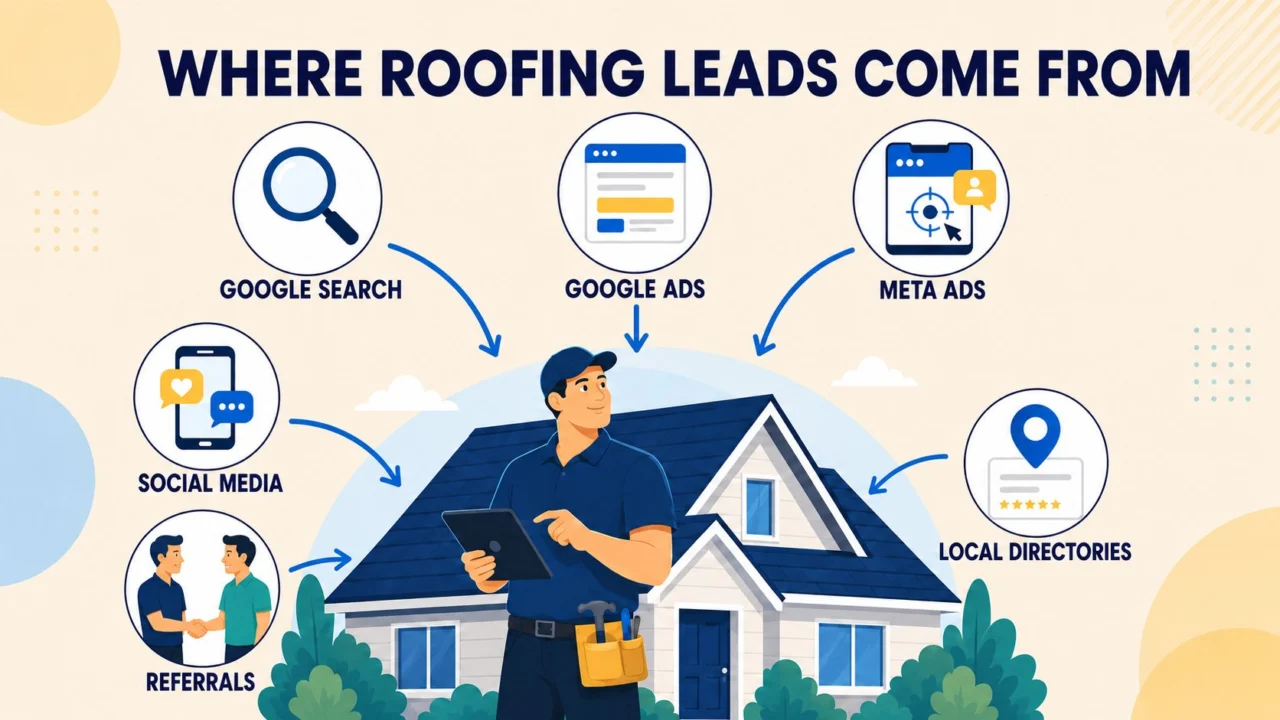
    Where roofing leads come from - Google Search, Google Ads, Meta Ads, social media, referrals and local directories

    Six channels produce nearly all roofing work. The mistake most contractors make is treating them as alternatives — picking one, judging it after three weeks, then moving on. They compound. Paid creates demand, search captures it, reviews and referrals lower the cost of both over time.

    1. Meta ads — the fastest route to volume

    If you want to know the best way to get roofing leads at volume, this is it. Facebook and Instagram put your offer in front of homeowners before they start searching, which matters because most people don’t research roofers until something leaks.

    The pattern that works: a free inspection or storm damage assessment offer, a fast-loading landing page, and automated follow-up within 60 seconds. On accounts we manage, this produces leads between $37 and $73. Our best roofing account, JP’s Roofing, generated 163 leads at $37.13 each on a $50/day budget.

    What fails: boosting posts, targeting “interest in home improvement”, and lead forms with eight fields. If you’re specifically researching how to get roofing leads on Facebook, the single highest-impact change is cutting your form to name, phone, postcode and job type.

    2. Google Ads and Local Services Ads

    Google captures people already typing “roof repair near me”. Intent is higher than Meta, and so is cost per click — but these leads convert faster because the homeowner has already decided they need a roofer.

    Local Services Ads are worth separating out: you pay per lead rather than per click, and you get the Google Guaranteed badge above regular results. For roofers with good reviews, LSAs are often the cheapest qualified lead available.

    3. Insurance and storm restoration work

    Contractors often ask how to get roofing leads from insurance companies, expecting a referral relationship that doesn’t really exist. Insurers don’t hand out contractor leads.

    What works is being the roofer a homeowner brings to the claim. That means campaigns built around the claim process — free storm damage inspection, help documenting the damage, working with the adjuster — triggered after hail and wind events in your service area. Public adjuster relationships also produce steady commercial work, though that’s networking rather than marketing.

    4. From ad to booked job: the follow-up gap

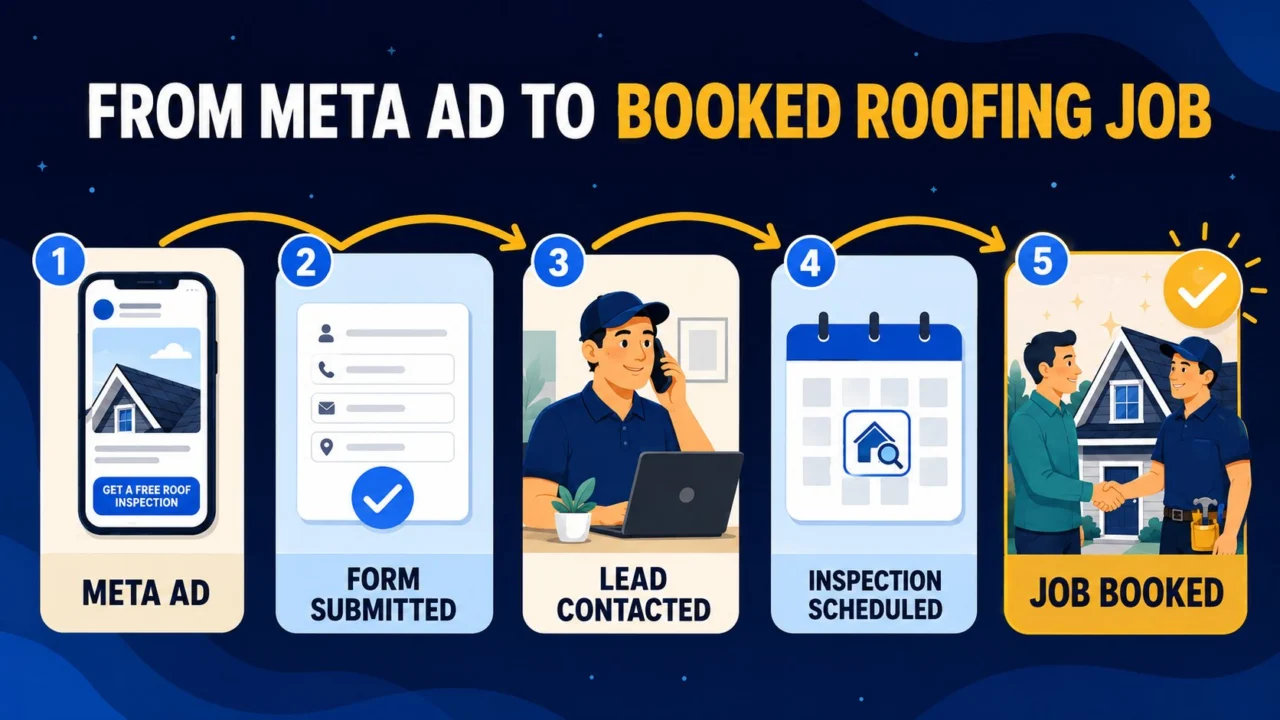
    From Meta ad to booked roofing job - ad, form submitted, lead contacted, inspection scheduled, job booked

    This is where most roofing companies lose money, and it has nothing to do with lead quality. A roofing lead contacted inside 60 seconds converts dramatically better than the same lead called back the next morning — because by then they’ve submitted forms to two competitors.

    If you’re wondering how to get more roofing leads without raising your budget, fix this first. Cutting form fields, adding a click-to-call option and automating an instant SMS routinely lifts booked jobs 30–50% on identical spend. It’s cheaper than buying more clicks.

    5. Google Business Profile and local SEO

    The free channel that actually scales. A complete profile with real photos, service areas and a steady flow of reviews wins the local map pack — which is where a large share of “roofer near me” traffic lands.

    This is also the answer to how to get free roofing leads. They’re not free exactly — they cost time and consistency — but there’s no ad spend. The trade-off is that you can’t turn them up on demand. If you need ten jobs next month, you need paid.

    6. Reviews and referrals

    Roofing is a trust purchase on an expensive, infrequent job. A 4.8 rating with 90 reviews beats a 5.0 with six, every time. Ask for the review at handover while the relief is fresh, not by email a fortnight later.

    Adjacent trades are underrated: gutter installers, siding contractors and solar companies are on roofs constantly and see damage before homeowners do. A simple reciprocal arrangement produces steady work at zero cost.

    7. Commercial roofing leads

    How to get commercial roofing leads is a different playbook entirely. Property managers and facility teams don’t respond to storm creative on Facebook — they search.

    Google Search around flat roof, TPO, EPDM and roof maintenance contracts works far better, alongside LinkedIn outreach and direct relationships with commercial property managers. Volume is much lower and sales cycles run months, but one contract can be worth twenty residential jobs.

    8. Lead brokers — and why we’d avoid them

    Angi, HomeAdvisor and Networx will sell you leads today. The catch is that the same homeowner is sold to three or four contractors simultaneously, so you’re racing to the phone and competing on price before you’ve said a word.

    Cheap per lead, expensive per booked job. And you build nothing — stop paying and the pipeline dies that day.

    9. How to get roofing leads without door knocking

    Door knocking still works after storms, and some crews are excellent at it. But it doesn’t scale, it burns your best salespeople, and in a lot of neighbourhoods it now hurts your brand more than it helps.

    Everything above replaces it. The honest version of how to get leads for roofing jobs at scale is: Meta for volume, Google for intent, Google Business Profile and reviews for the free layer, and follow-up fast enough that the lead is still warm.

    What roofing leads cost

    Across accounts we manage, cost per lead runs $37–$73, blended around $58. Four things move it: market competitiveness, service radius, season (storm season pushes cost down because demand spikes) and budget size.

    The number that actually matters is cost per booked job. A $15 shared lead sold to four roofers is worse value than a $60 exclusive lead that answers the phone.

    Roofing leads in the USA, Canada and the UK

    Search behaviour differs more than you’d expect. American roofers search “roofing leads” — they want to buy them. Canadian and British roofers search roofing SEO and roofing marketing — they’re looking for help getting found.

    In the UK especially, the demand is around SEO for roofing companies and local SEO for roofing companies rather than lead purchasing. Less storm-driven work, more repairs, flat roofs and re-roofing, with longer consideration cycles — so nurture matters more than raw volume.

    The bottom line

    There’s no single best channel. Run Meta for volume and Google for intent, fix your follow-up speed, and let reviews and Google Business Profile compound underneath. Judge everything on booked jobs, not leads.

    If you’d rather not build that yourself, that’s what we do — exclusive roofing leads generated in your own ad accounts, with a 15-day trial and the real screenshots to back it up.

  • How to Increase Website Traffic Organically

    INSIGHTS / THE DIGITAL PENGUIN

    How to Increase Website Traffic Organically

    How to increase website traffic organically — SEO growth illustration

    If you want more sales, you need more of the right visitors — and the most cost-effective way to get them is organic search. Unlike paid campaigns, organic traffic doesn’t disappear when the budget runs out: a page that ranks keeps sending visitors month after month. Growing it, though, takes a system, not a trick. Here’s the one we use.

    1. Start with keywords people actually search

    Everything begins with keyword research. Before writing a single page, find out what your potential customers type into Google — the exact phrases, the questions, the comparisons. Tools like Google Keyword Planner, Ahrefs, and SEMrush show you search volume and competition, but the real skill is picking keywords with buying intent that you can realistically rank for.

    • Long-tail keywords (“best accounting software for small trucking companies”) convert far better than broad ones (“accounting software”) and are much easier to rank for.
    • Question keywords (“how much does a website redesign cost”) are perfect for blog posts and often win featured snippets.
    • Local keywords (“SEO agency in Toronto”) matter enormously if you serve a geographic area.

    2. Publish content that actually answers the query

    Google’s job is to serve the best answer. Your job is to be it. That means going deeper than the pages that currently rank: clearer structure, better examples, more complete answers, faster to the point. Thin, generic posts written “for SEO” don’t rank anymore — genuinely useful ones do.

    3. Get the on-page basics right, every time

    • One clear H1 containing the main keyword, with logical H2/H3 subheadings.
    • A compelling title tag and meta description — these determine whether people click your result.
    • Descriptive URLs (yoursite.com/organic-traffic-guide, not /p=4823).
    • Internal links from related pages — they pass authority and help Google understand your site’s structure.
    • Image alt text that describes the image and, where natural, includes relevant keywords.

    4. Make your site fast and mobile-first

    Speed is a ranking factor and a conversion factor. Most organic visits now come from phones, and a slow mobile page loses the visitor before it loses the ranking. Compress images, use caching, keep plugins lean, and test with Google PageSpeed Insights. A site that loads in under three seconds keeps both Google and your visitors happy.

    5. Earn backlinks from relevant sites

    Links from other websites remain one of the strongest signals that your content deserves to rank. Guest posts on industry blogs, digital PR, genuinely shareable resources, and outreach to sites that mention your topic all build the authority that lifts every page on your domain. (We cover this in detail in our guide to backlinks.)

    6. Stay consistent — and measure

    Organic growth is a compounding curve, not a spike. Publish on a regular schedule, refresh older posts that are slipping, and track everything in Google Search Console: which queries you appear for, which pages earn clicks, and where you’re on page two with an easy push to page one. The businesses that win at SEO aren’t the ones with secrets — they’re the ones still publishing in month twelve.

    The bottom line

    Organic traffic is the cheapest customer acquisition channel you’ll ever build — but it’s built, not bought. If you’d rather have a team handle the keyword research, content, and technical work for you, that’s exactly what our SEO services are for.